How to Increase Client Side RAM in Project Zomboid

Project Zomboid defaults to 2GB of RAM for the game client. If you are playing with a heavily modded server, increasing this allocation reduces stuttering and out-of-memory crashes. Here is how to do it.

Why the Default RAM Limit Causes Problems

Project Zomboid runs on the Java Virtual Machine and ships with a 2GB memory cap set via the JVM flag -Xmx2048m. For vanilla play this is usually enough, but large mod packs, custom maps, and high player count servers push the game well past 2GB of usage. When the client hits its memory ceiling, Java's garbage collector kicks in aggressively, causing visible stutters and frame drops. If it cannot recover, the game crashes with an out-of-memory error in the log.

Increasing the cap gives the JVM more headroom, which means less garbage collection pressure and smoother gameplay.

Does This Affect Other Apps or System Java

No. Project Zomboid includes its own embedded Java runtime (JRE) inside the game folder. The -Xmx flag in this file only applies to that specific PZ process. Your system Java installation and other apps are completely unaffected.

If the game still crashes after increasing RAM, the cause is likely a memory leak in a mod or an outdated mod conflicting with the current game version. More RAM gives you headroom but does not fix a leak. Check your mod list for anything that has not been updated recently.
01

Find Your Game Files

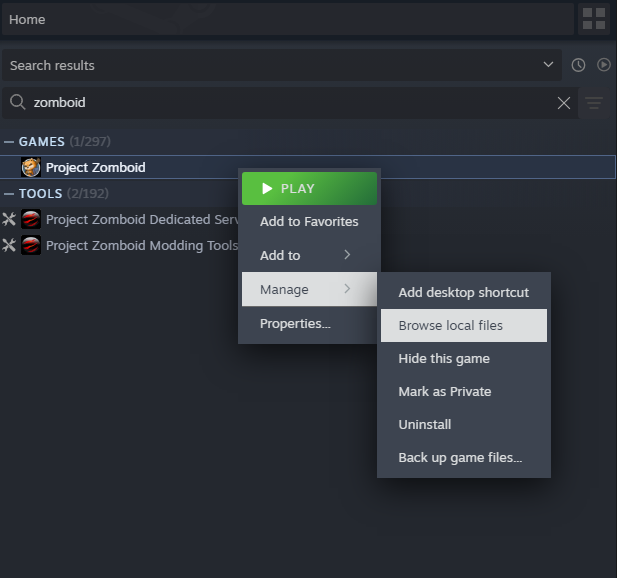
Open Steam, right-click Project Zomboid, go to Manage, then Browse Local Files. This opens the game installation folder.

Find Your Game Files
02

Open ProjectZomboid64.json

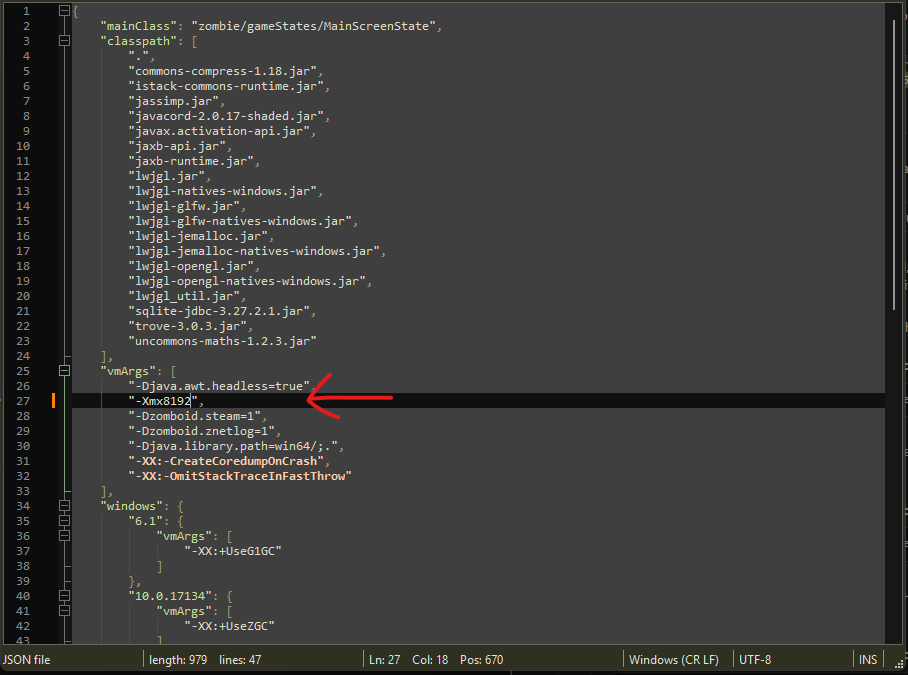
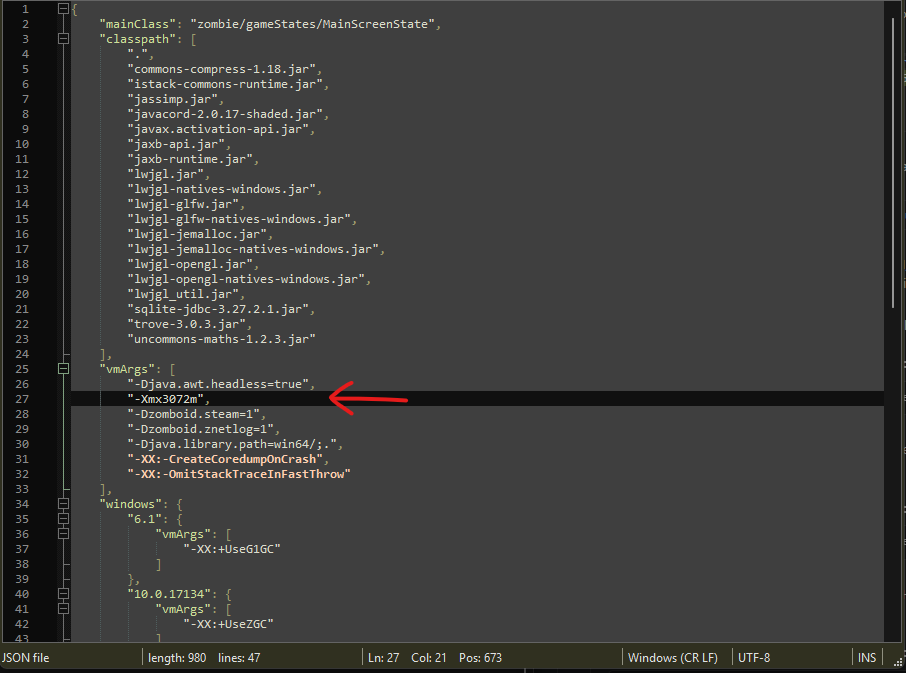
In the game folder, find ProjectZomboid64.json and open it with Notepad. Look for the vmArgs array. You will see a line like -Xmx2048m which sets the max heap to 2GB.

Open ProjectZomboid64.json
03

Change the Value

Replace the number with your desired allocation in megabytes:

  • -Xmx4096m - 4GB, recommended for most modded playthroughs
  • -Xmx6144m - 6GB, for large mod packs
  • -Xmx8192m - 8GB, for very large mod packs or high-res texture mods

As a rule of thumb, do not set this above roughly two-thirds of your total system RAM. On an 8GB system, keep it at 5120 or lower so Windows and other apps still have memory to work with.

Change the Value
04

Optionally Add a Minimum Heap Size

You can also add -Xms (minimum heap size) set to the same value as -Xmx. This pre-allocates memory at startup instead of letting Java grow it gradually, reducing early-game stutter. This is optional.

05

Save and Verify

Save the file and launch the game through Steam normally. The new limit takes effect immediately - no Steam launch option changes needed.

To verify: open Task Manager and watch the ProjectZomboid64.exe memory column while loading a modded server. If it climbs past 2GB without crashing, the change worked.