No More "Server Needs Restart" Messages
Most Project Zomboid server hosts run on Pterodactyl or a rebranded fork of it. Scheduled restarts on those panels are cron-style commands: you write a schedule, it sends a stop signal, and the server goes down without warning. Players get disconnected mid-loot run with no notice, then flood your Discord asking what happened.
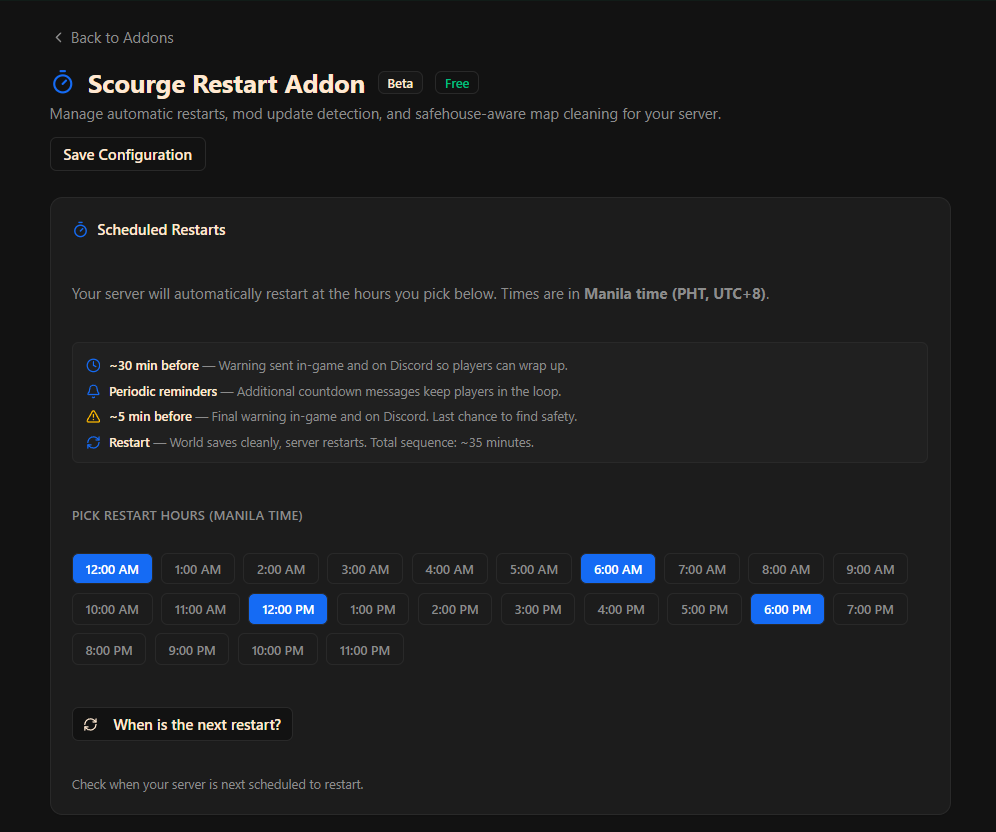
The Scourge Restart Addon works differently. You pick the hours you want restarts to happen and the system runs a full sequence automatically: an in-game broadcast and Discord notification 30 minutes before, a second warning at 5 minutes, then a clean world save and restart. The server comes back up on the hour. Players know it is coming, they have time to find safety, and your Discord stays quiet.
Automatic Mod Update Restarts
The other common pain point on modded servers is mod updates. A Workshop mod gets updated, new players trying to join get a "Workshop Item different from server" error and cannot connect, and someone has to notice, post in Discord, and manually restart the server. The Mod Update Detector eliminates this: before each scheduled restart, the addon checks Steam Workshop against your installed mods. If an update is found, the server restarts to apply it automatically. No manual checking, no player complaints about version mismatches.
Manual Restart Controls
The Announcements and Restart Sequences section at the bottom of the page lets you trigger restarts manually at any time:
- Quick Restart - 10-second countdown then restart (approximately 1 minute total)
- Full Restart - full 35-minute sequence with in-game and Discord warnings
- Send 30-minute Warning or Send 5-minute Warning - broadcast a warning without triggering a restart
All times are in Manila time (PHT, UTC+8). Pick hours when your server is low-traffic. A common setup for PH servers is 4 AM, 12 PM, and 8 PM.
If you want to manually remove unused map chunks before your next restart, use the free Project Zomboid Chunk Cleaner tool.