Why Generic RAM Advice Gets Servers Killed
Search for "how much RAM does a Project Zomboid server need" and you will find the same answer everywhere: 2GB for vanilla, 4GB for small modded, 8GB for large modded. That advice is not wrong, but it is incomplete. It does not account for mod quality, server configuration, restart discipline, or how your host actually allocates memory. As a result, server admins either over-buy and waste money, or under-buy and spend weekends dealing with crashes.
This article is based on real benchmark data from Build 41 production servers we host. Not documentation, not community estimates. Actual usage numbers from running servers with real players.
Note: this article covers Build 41 only. Build 42 is currently in the unstable branch and its memory model differs significantly from B41. We will update this with B42 data once it reaches a stable release.
What Actually Drives Server RAM Usage
A PZ server is a Java process. Its memory usage breaks down into a few distinct components:
Base Java heap: the JVM itself plus the game engine loads roughly 1 to 1.5 GB before any world or players exist.
World chunks: every chunk of map that players have explored stays loaded in memory. A large, old map where players have spread out across the world holds far more data than a fresh map with players in one area. There is no in-game setting to control this directly.
Mod data: each mod adds scripts, textures, and item definitions to the heap. Mod count matters, but mod quality matters more. A well-coded mod with 500 items uses less memory than a poorly written mod with 50 items that holds references it never releases.
Player sessions: each connected player adds inventory data, character state, and simulation overhead. A rough community baseline is around 0.5 GB per player slot, but this assumes no mods and a fresh map. In practice, optimized modded servers consistently do better than this number.
Zombie population: the server tracks AI state, position, and pathfinding data for every active zombie. Extreme zombie density settings push memory usage up significantly, independent of player count or mods. If your server is struggling, lowering
PopulationMultiplierinservertest_SandboxVars.luais one of the fastest ways to reduce both CPU and memory pressure.
PZ servers accumulate memory over time as the map is explored. A server that has been running for months will use more RAM than the same server on day one, even at the same player count. Daily restarts reset this accumulation and are the single most impactful thing you can do for long-term server stability.
Real Benchmark Data (Build 41)
The following ranges are based on production servers we actively host. These are observed numbers, not theoretical limits.
Setup | Players | Mods | Observed RAM |
|---|---|---|---|
Vanilla, no mods | 1-10 | 0 | 1.5 - 2.5 GB |
Lightly modded | 10-20 | ~50 | 3 - 5 GB |
Heavily modded | 20-30 | 150-230 | 6 - 12 GB |
Poorly configured (any) | any | any | 15 - 18 GB+ |
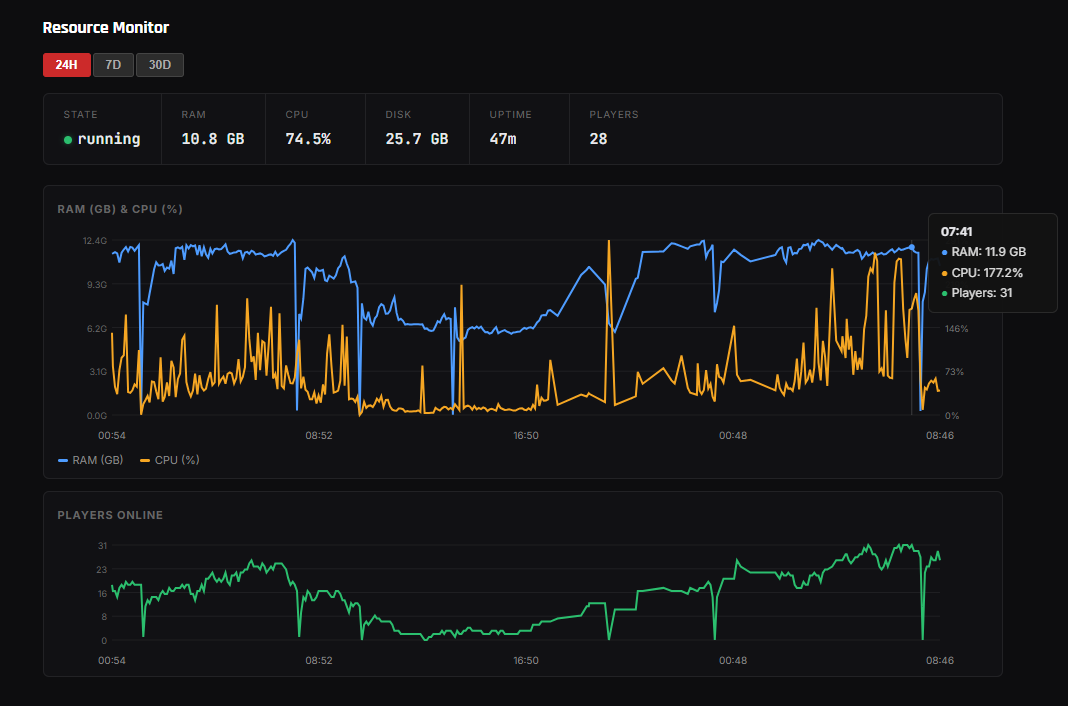
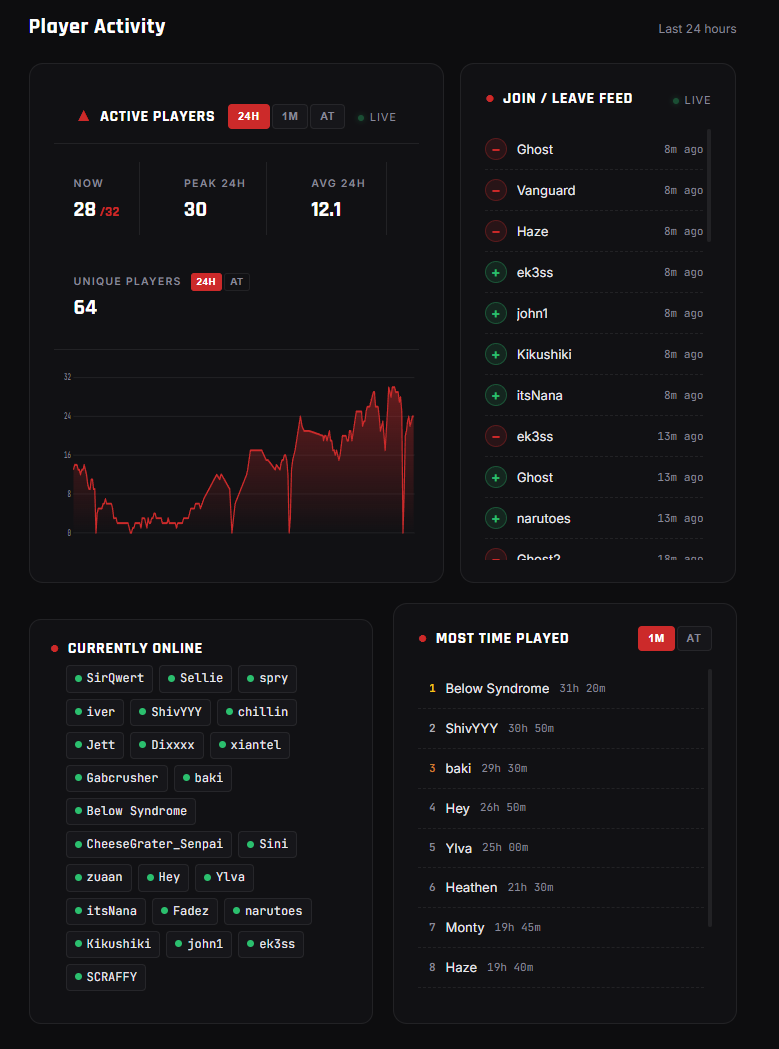
To put a real number to this: one of our active servers runs a modlist of approximately 230 mods. At peak we recorded 11.9 GB with 31 players online. The running figure at the time of capture was 10.8 GB with 28 players. By the common community estimate of 0.5 GB per player, you would expect around 14 GB for 28 players. The actual number is 10.8 GB, roughly 23% lower. That gap comes from optimization: a curated modlist, well-tuned server configuration, and a tool that most servers skip entirely.
Scourge Restart Addon: Map Chunk Cleaner This addon runs while the server is offline and removes explored-but-unused map data from disk. The result is that the Java heap starts each session lighter, instead of reloading months of accumulated chunk data on the first restart. This is one of the primary reasons our benchmark server runs well below the community estimate for its player count. It is available exclusively on Scourge Servers plans.
In all the servers we have hosted, we have never seen a single server exceed 20 GB of RAM. That is the basis for our plan cap at 20 GB. It is not an arbitrary number.
Why Some Servers Use Far More RAM Than They Should
If you have seen forum posts from server owners claiming 16, 32, or even 64 GB of RAM for a modest player count, a few things are likely at play:
No daily restart: without a scheduled restart, the Java heap grows as the map is explored and never fully recovers, even with garbage collection. A server that has been running for weeks without a restart will use two to three times more RAM than the same server restarted daily.
Memory-leaking mods: some mods hold references to objects they no longer need. This does not show up in the mod count. It shows up six hours into a session when RAM is still climbing and never plateaus.
Excessive map exploration: PZ loads and caches map chunks as players explore. A large, old map where players have spread out across the world keeps far more data resident in the heap than a fresh map with players clustered together. There is no in-game knob to control this directly, which is another reason daily restarts matter.
You can detect a leak in real time using the in-game Admin Panel. Open it and look for Show Statistics, or type /stopwatch in chat as an admin to open it directly. The "Used MB" value will climb continuously and never plateau if something is leaking. When you see this, restart the server and start disabling mods in batches to find the offender. Look for mods with large item packs or ones that have not been updated recently.
We have had customers migrate to us after being on plans with dramatically more RAM than they needed. In one case, a server running 10 to 20 players had been upgraded to a 64 GB plan at their previous host, with RAM usage still climbing to the ceiling. After migrating and applying proper configuration, the same server runs comfortably under 10 GB. The issue was never the game. It was configuration and restart discipline.
What You Actually Need
Based on our benchmarks, here is a practical guide:
6 GB: vanilla or very lightly modded servers with up to 10 players. Safe starting point for a small private group with minimal mods.
10 GB: active Workshop modlist of 50 to 150 mods with up to 20 to 25 players. The practical sweet spot for most community servers.
20 GB: large community servers with 200 or more mods and 30 or more concurrent players. Also appropriate if your admins do not restart frequently or if your modlist includes custom maps with large footprints.
In all cases, a daily scheduled restart is the single highest-impact configuration change you can make for memory management. On Scourge Servers, this is configurable directly from the panel without touching any config files.
If you want to see our current plans and what each includes, check the server plans page.
A Note on Build 42
Build 42 introduces significant engine changes that affect how the server handles memory. Early testing in the unstable branch shows different baseline usage and different scaling behavior compared to B41. The numbers in this article do not apply to B42 servers.
Once Build 42 reaches a stable release and we have enough production data, we will update this article with B42 benchmarks.
Want to reduce chunk bloat on your server right now? Use the free Project Zomboid Chunk Cleaner tool to scan your save and remove unused map files directly from your browser.